Somewhere on your team, someone is probably copying and pasting order data into a spreadsheet right now. It is not because they are inefficient. It is because nobody ever connected the tools that should be talking to each other, and ecommerce workflow automation never made it onto the priority list.
This is one of the most common, and most quietly expensive, problems in growing ecommerce businesses. Shopify, your CRM, your email platform, and your accounting software all hold pieces of the same customer record, but for most small and mid-sized stores, those systems were never actually connected.
So someone connects them manually: copying an order here, updating a contact there, exporting a list before a campaign goes out.
Here is why it happens, what it actually costs, and how to fix it without automating everything at once.
Why Manual Data Entry Becomes Normal
Nobody sets out to build a manual process. It almost always starts small.
One new order a day is easy to log by hand. A handful of new contacts a week is manageable in a spreadsheet. Then the business grows, order volume increases, and the manual workaround grows right along with it instead of getting replaced.
By the time the process is causing real problems, it is already baked into how the team works.
Fixing it feels disruptive, so it gets left alone, and the workaround becomes “how we’ve always done it” rather than a temporary fix that was never meant to last.
What This Actually Costs a Growing Ecommerce Business
Manual data entry causes damage quietly, in two specific ways.
Lost Time That Should Go Toward Growth
Every hour spent manually syncing an order, updating a CRM record, or building an email list by hand is an hour not spent on marketing, customer experience, or product decisions.
For a small team, this adds up to a meaningful chunk of the work week, and it rarely shows up as a line item anywhere.
Data Gaps That Cause Real Business Problems
Manual processes fail inconsistently, which makes them hard to catch.
A customer places an order on Shopify but never gets added to the CRM.
An email list goes out a week out of date because nobody had time to update it before the campaign.
A support ticket references an order that accounting has no record of yet.
None of this shows up as a cost on a spreadsheet. Both the lost time and the data gaps are real costs anyway, and they tend to get worse, not better, as the business scales.
How Ecommerce Workflow Automation Fixes This
This is usually a smaller fix than business owners expect, and it does not require replacing any of the tools already in use.
Connecting the Systems That Already Exist
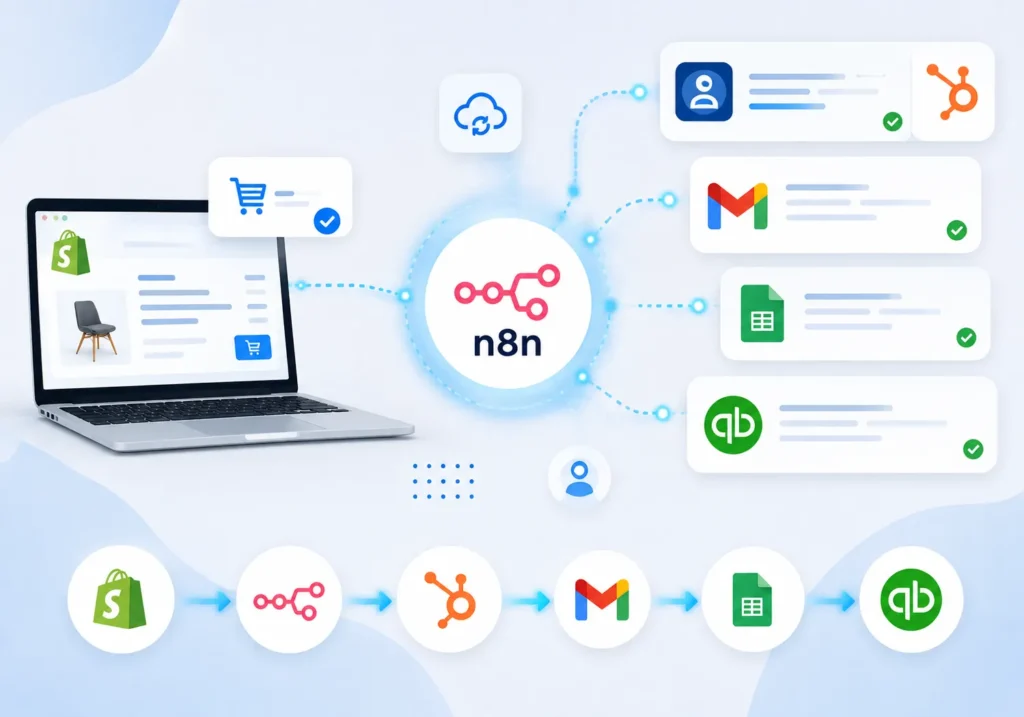
Automation platforms like n8n can connect Shopify, a CRM, and an email platform directly, so that a new order automatically updates the right records in every system without anyone touching a keyboard.
The tools themselves do not change. The manual handoff between them disappears.
This is where Shopify CRM integration becomes valuable for growing ecommerce businesses. Instead of manually transferring customer information between platforms, your systems can communicate automatically.
Start With the Two or Three Handoffs Costing the Most Time
Most businesses do not need to automate everything at once.
Trying to automate every process immediately is usually where automation projects stall.
The better approach is identifying the two or three manual handoffs eating the most time, such as:
- Order-to-CRM syncing
- Customer data updates
- Email list management
- Repetitive order data entry
Then automate those first.
According to McKinsey’s research on workplace automation, targeted automation of specific repetitive tasks often delivers more practical value than attempting to automate an entire workflow at once.
What a Typical Setup Looks Like
- A common starting workflow for an ecommerce business looks like this:
- A new Shopify order triggers an automatic update to the CRM with the customer’s details and order history.
- At the same time, the customer is added to the correct email marketing segment based on what they purchased.
- What used to take several manual steps across three different tools now happens in seconds, with no risk of the update being forgotten during a busy week.
- This type of Shopify email marketing integration helps businesses create faster customer follow-ups while keeping their data accurate.
Signs Your Business Is Ready for This
Workflow automation tends to make the most sense once a few signs start showing up:
- Someone on the team spends a recurring block of time every week on data entry that follows the same steps.
- Customer or order information regularly ends up inconsistent between systems.
- The business has grown past the point where manual tracking was originally set up for.
- The team has said out loud, more than once, that “someone really needs to fix this.”
If two or more of these sound familiar, the manual process has likely already cost more in time than an automated workflow would cost to set up.
Getting Started Without Overcomplicating It
The businesses that get the most value from automation usually start with a short audit rather than a full system overhaul.
Step 1: Map the Current Handoffs
Write down every place data currently moves between tools by hand and how often it happens.
Look for repetitive actions involving:
- Orders
- Customers
- Emails
- Inventory updates
- Reports
Step 2: Rank Them by Time Cost
Not every manual task is worth automating first.
Start with the processes consuming the most hours or causing the most data errors.
A small automation that saves five hours every week can create more value than a large project that takes months to complete.
Step 3: Automate the Highest-Impact Handoff First
Build and test one workflow.
Confirm it works reliably.
Then move to the next process.
This approach reduces risk and allows your team to improve gradually without disrupting daily operations.
Step 4: Review and Expand
Once the first workflow is stable, the same approach usually extends naturally to other handoffs across the business.
Over time, ecommerce automation tools can help create a connected system where customer, order, and marketing data flows automatically.
Frequently Asked Questions
What is ecommerce workflow automation?
Ecommerce workflow automation is the practice of connecting the tools a business already uses, such as Shopify, a CRM, and an email platform, so that data moves between them automatically instead of being copied manually.
Do I need to replace my current tools to automate this?
No.
Automation platforms like n8n connect existing tools through their APIs. The tools stay the same; only the manual handoff between them is removed.
Is this only useful for large businesses?
No.
Smaller teams often benefit the most because manual data entry consumes a larger share of a small team’s available time compared to a larger company with dedicated staff.
How long does it take to set up a basic automation like this?
A single workflow connecting two or three tools, such as Shopify to a CRM, can typically be built and tested within a few days, depending on how existing systems are configured.
Final Thoughts
The manual work happening on your team right now usually is not a people problem.
It is a systems problem that has been quietly accepted for too long because it started small and never felt urgent enough to fix.
Ecommerce workflow automation does not have to mean automating everything at once.
Fixing the two or three handoffs costing the most time is often enough to give your team hours back every week and close the data gaps that manual processes tend to create.
Our team at VirtualWebTek’s automation services builds these workflows for growing ecommerce businesses, and we are happy to take a look at your current setup.
What’s the one task on your team that everyone agrees is tedious, but nobody’s had time to fix?